All Google Sheets updates
187 updates to Google Sheets tracked so far.
-
2018-04-11Content & Collaboration

Record macros in Google Sheets to automate repetitive tasks.
Google Sheets now allows users to record macros in the cloud to automate repetitive tasks without needing to write code. The macro recorder automatically converts actions into Apps Script, which can be edited directly for updates. Because these macros are cloud-based, teams can run them simultaneously without interrupting other collaborators working in the same sheet.
Release: Both • Rapid: 2018-04-11 • Scheduled: 2018-04-11 -
2018-01-09Content & Collaboration
Braille support added to Google Sheets
Google Sheets now supports Braille displays, enabling users to read and edit cell contents and navigate between cells. This feature is currently available on Chrome OS using the ChromeVox screen reader.
Release: Both • Rapid: 2018-01-09 • Scheduled: 2018-01-09 -
2017-12-06Content & Collaboration

Google Sheets introduces intelligent pivot table suggestions, formula suggestions, and enhanced data analysis tools.
Google Sheets is adding several AI-powered and analytical features to help users uncover insights. This includes intelligent pivot table suggestions via the Explore panel and natural language processing, machine-learning-based formula suggestions, a refreshed pivot table UI with customizable headings, new pivot table calculation options (such as showing values as a percentage of totals), the addition of waterfall charts, and improved importing of fixed-width formatted data files.
Release: Both • Rapid: 2017-12-06 • Scheduled: 2018-01-24 -
2016-01-27Other
Comments in the Google Sheets and Slides apps for Android and iOS
Users can now add new comments and reply to existing comments within the Google Sheets and Slides mobile apps for Android and iOS, bringing parity with the Google Docs mobile apps.
Release: Both • Rapid: 2016-01-27 • Scheduled: 2016-01-27 -
2015-12-14Content & Collaboration
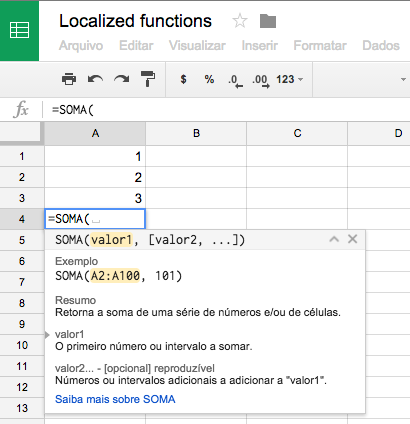
Google Sheets functions are now available in users' preferred languages.
Google Sheets now supports displaying functions in the user's preferred language for English and 21 other supported languages across both web and mobile platforms. New users will see functions in their preferred language automatically, while existing users can choose whether to keep functions in English or switch to their preferred language via the Spreadsheet settings in the File menu.
Release: Both • Rapid: 2015-12-14 • Scheduled: 2016-01-11 -
2015-11-12Content & Collaboration
Enhanced commenting, chart creation, and font support in the Google Sheets app for Android.
The Google Sheets app for Android now allows users to add new and reply to existing comments. Chart creation is improved with automatic data selection expansion and three recommended chart types based on selected data. Additionally, users can now view over 400 new fonts that were previously added to Sheets on the web.
Release: Both • Rapid: 2015-11-12 • Scheduled: 2015-11-12 -
2015-10-28Content & Collaboration
Paste special feature added to Sheets Android app
The Sheets Android app now supports the 'Paste special' feature, enabling users to copy content and paste only specific elements such as values, formatting, formulas, data validation, or conditional formatting, as well as the ability to transpose content.
Release: Both • Rapid: 2015-10-28 • Scheduled: 2015-10-28 -
2015-10-28Content & Collaboration
View existing filters in the Sheets Android app
Filters applied to data in Google Sheets on the web are now visible within the Sheets Android app, providing users with clarity on whether they are viewing filtered content.
Release: Both • Rapid: 2015-10-28 • Scheduled: 2015-10-28 -
2015-10-28Content & Collaboration
Hide toolbars and headers when scrolling or zooming in Sheets Android app
The Google Sheets Android app now automatically hides toolbars and headers when a user scrolls down or zooms in on a spreadsheet, allowing more of the content to be visible on the screen at once.
Release: Both • Rapid: 2015-10-28 • Scheduled: 2015-10-28 -
2015-09-22Content & Collaboration
New formatting options for pasting content in Google Sheets.
Google Sheets now offers alternative formatting options after pasting content via a small widget that appears in the bottom corner of the pasted cells. Users can select 'Paste values only' to remove formatting or 'Paste format only' to apply only the cell's style. Additionally, Chrome users can use the shortcut Ctrl + Shift + V to automatically paste values without formatting.
Release: Both • Rapid: 2015-09-22 • Scheduled: 2015-10-06 -
2015-09-16Content & Collaboration
Ability to insert and modify chart types in the Google Sheets Android app.
The Google Sheets Android app has been updated to allow users to insert charts and change their types directly within the mobile application. For example, users can now quickly change a bar chart inserted from Explore into a column chart without needing to use the web version of Sheets.
Release: Both • Rapid: 2015-09-16 • Scheduled: 2015-09-16 -
2015-09-02Content & Collaboration
Partial cell formatting in Google Sheets
Users can now select and apply text formatting to only a portion of the characters within a single cell in Google Sheets on the web and Android app.
Release: Both • Rapid: 2015-09-02 • Scheduled: 2015-09-21 -
2015-09-02Content & Collaboration
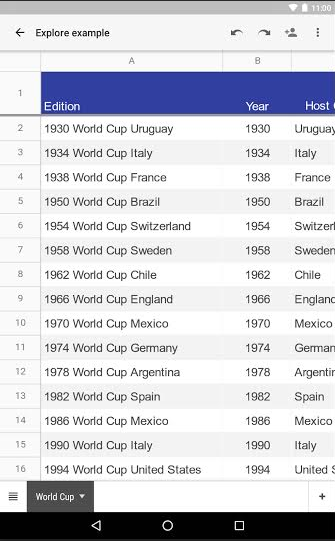
Explore in Google Sheets
The Explore feature in Google Sheets (web and Android) automatically analyzes spreadsheet data to create dynamic charts, surface insights, and perform instant calculations.
Release: Both • Rapid: 2015-09-02 • Scheduled: 2015-09-21 -
2015-08-20Content & Collaboration
More intuitive keyboard functionality in Google Sheets for Android
The Google Sheets Android app now automatically launches the alphabetic keyboard when a cell contains text and the numeric keyboard when a cell contains numbers or symbols, while also offering an easy way to shift between the two options.
Release: Both • Rapid: 2015-08-20 • Scheduled: 2015-08-20 -
2015-08-20Content & Collaboration
Autofill in Google Sheets for Android
The autofill feature, which allows users to repeat information or complete a pattern in a spreadsheet, is now available in the Google Sheets app for Android.
Release: Both • Rapid: 2015-08-20 • Scheduled: 2015-08-20