All Google Sheets updates
187 updates to Google Sheets tracked so far.
-
2015-08-03Content & Collaboration
Include hidden and filtered data in Google Sheets charts.
Google Sheets now provides the option to include hidden or filtered source data in charts. When users filter or hide source data, a notification appears allowing them to include that data in the chart. This setting can also be toggled within the Chart Editor under the 'Chart types' section by checking or unchecking 'Include hidden / filtered data'. This update also improves the accuracy of imported Microsoft Excel spreadsheets that contain hidden data.
Release: Both • Rapid: 2015-08-03 • Scheduled: 2015-08-17 -
2015-06-29Content & Collaboration
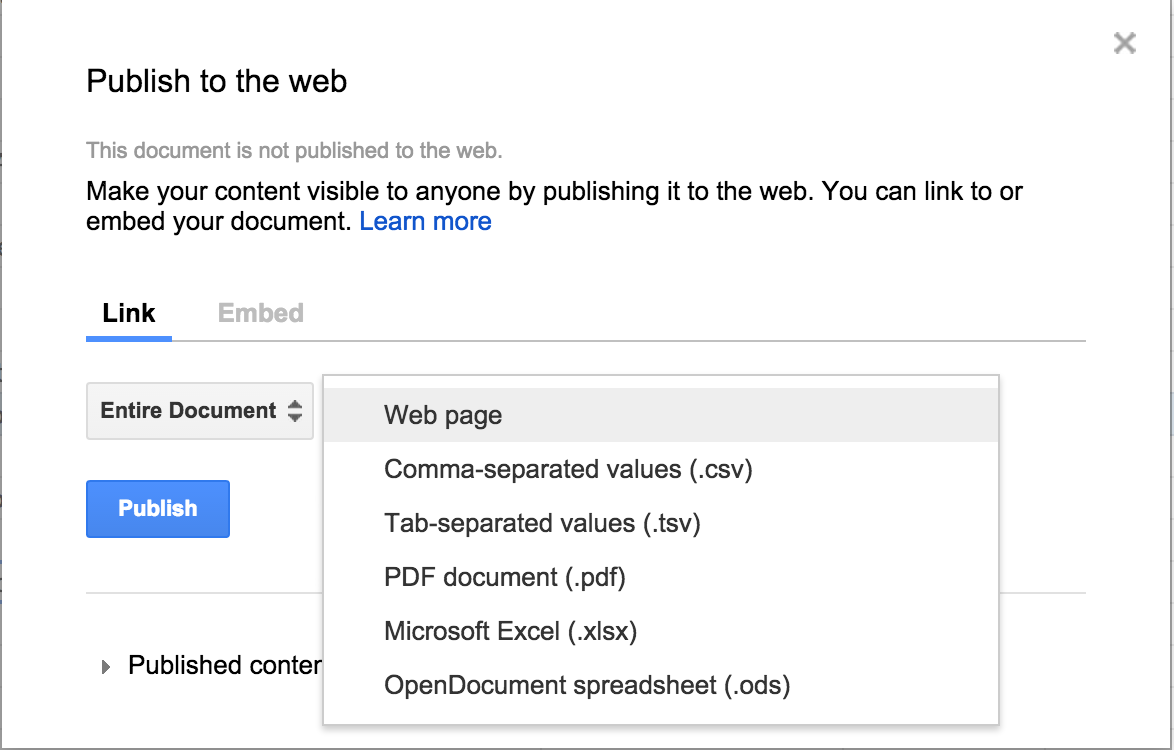
Google Sheets now supports publishing spreadsheets in five additional formats: .csv, .tsv, .pdf, .xlsx, and .ods.
Users of Google Sheets on the web can now publish their spreadsheets in five additional formats beyond the standard web page: comma-separated values (.csv), tab-separated values (.tsv), PDF documents (.pdf), Microsoft Excel spreadsheets (.xlsx), and OpenDocument spreadsheets (.ods). When the generated URL is opened in a browser, the spreadsheet will automatically download in the chosen format.
Release: Both • Rapid: 2015-06-29 • Scheduled: 2015-06-29 -
2015-06-16Content & Collaboration
Insert images into Google Sheets while offline
Users can now insert images into Google Sheets when working offline in the Chrome browser, provided that offline access has been enabled. Any images inserted while offline will be synced once the user regains internet connectivity.
Release: Both • Rapid: 2015-06-16 • Scheduled: 2015-06-16 -
2015-06-15Content & Collaboration
Introduction of protected cell warnings to prevent accidental edits.
To facilitate safer collaboration, Google Sheets now allows owners to set warnings for individuals who attempt to edit certain cells, reducing unintended changes like typos without requiring complex permission settings.
Release: Both • Rapid: 2015-06-15 • Scheduled: 2015-06-15 -
2015-06-15Content & Collaboration
Pivot table enhancements with calculated fields and GETPIVOTDATA function.
Google Sheets has introduced calculated fields to pivot tables, allowing users to apply formulas to pivot table data, and the GETPIVOTDATA function to retrieve specific data from a pivot table.
Release: Both • Rapid: 2015-06-15 • Scheduled: 2015-06-15 -
2015-06-15Content & Collaboration
New data analysis tools including formula previews and conditional filtering.
Users can now preview formula results and errors instantly as they type and filter rows and columns based on specific conditions such as 'less than', 'greater than', 'text contains', and 'date after'.
Release: Both • Rapid: 2015-06-15 • Scheduled: 2015-06-29 -
2015-06-15Content & Collaboration

Enhanced chart customization options in Google Sheets.
Google Sheets now offers more ways to visualize data with the addition of data labels to display exact values of bars and points, custom shapes and symbols for data points in line and scatter charts, and improved functionality for moving and resizing charts.
Release: Both • Rapid: 2015-06-15 • Scheduled: 2015-06-29 -
2012-09-20Content & Collaboration
Google Spreadsheets introduces discussions and user +mentions for better collaboration.
Users can now collaborate more efficiently in Google Spreadsheets through the addition of discussions, which includes the ability to +mention users to add them to a conversation.
Release: Scheduled • Scheduled: 2012-09-18 -
2012-09-12Content & Collaboration
Enhanced collaboration with discussions and +mentions in Google Spreadsheets.
Google Spreadsheets is introducing new discussion features to allow users to collaborate more efficiently, including the ability to +mention users to add them to a discussion.
Release: Scheduled • Scheduled: 2012-09-18 -
2012-09-07Content & Collaboration
Discussions and +mentions are now available in Google Spreadsheets.
Google Spreadsheets users can now collaborate more efficiently using discussions, which includes the ability to +mention users to add them to the conversation.
Release: Rapid • Rapid: 2012-09-07 -
2012-08-22Content & Collaboration
Customizable cell border colors and styles.
Users can now pick the color and style of cell borders through an added option available via the cell borders toolbar button.
Release: Scheduled • Scheduled: 2012-08-22 -
2012-08-22Content & Collaboration
Ability to name and protect ranges in spreadsheets.
Users now have the ability to name a range in a spreadsheet. This allows users to protect a specific named range instead of the entire sheet and utilize the range name within formulas.
Release: Scheduled • Scheduled: 2012-08-22 -
2012-08-15Content & Collaboration
Custom cell border colors and styles
Users can now pick the color and style of cell borders through an added option in the cell borders toolbar button.
Release: Scheduled • Scheduled: 2012-08-21 -
2012-08-15Content & Collaboration
Named ranges in spreadsheets
Users now have the ability to name a range in a spreadsheet. This allows users to protect a specific named range instead of the whole sheet and use the range name within formulas.
Release: Scheduled • Scheduled: 2012-08-21 -
2012-08-08Content & Collaboration
New border color and style options for cells in Google Spreadsheets.
Users can now customize the appearance of their spreadsheets by picking the color and style of cell borders. This feature is accessible through an added option in the cell borders toolbar button.
Release: Rapid • Rapid: 2012-08-08