All Google updates
2175 updates to Google tracked so far.
-
2025-07-14Admin & Security
.png)
Migration of files from Microsoft SharePoint Online to Google Drive is now generally available via the New Data Migration service.
The functionality to migrate files from Microsoft SharePoint Online to Google Drive, previously in open beta, is now generally available through the New Data Migration service. This service allows admins to transfer data from SharePoint Online sites, including document libraries, folders, files, and associated permissions, facilitating a smooth transition to Google Workspace. The migration process supports up to 100 SharePoint Online sites at a time to Shared Drives, provides comprehensive reporting, and offers delta updates for newly added or modified files.
Release: Both • Rapid: 2025-07-14 • Scheduled: 2025-07-14 -
2025-07-11Other
The Workspace Updates Blog is launching a new look and feel with a refreshed user interface and improved navigation.
The official Workspace Updates Blog is set to launch a completely refreshed user experience on Monday, July 14. This update will align the blog's interface with other official Google channels, offering a more modern and consistent look. Key improvements include a compact layout for quicker scanning of multiple posts, easier navigation through product tags categorized at the top, and quick links to other resources like the Release Calendar. Additionally, the blog will feature auto-translation for over 100 languages via Google Translate from the footer, with all updates also accessible on mobile.
Release: Scheduled • Scheduled: 2025-07-14 -
2025-07-11Content & Collaboration
Google Vids introduces a new "balance sound" feature to automatically level audio across videos and apply audio ducking to background music.
Building on a pre-announcement from May, Google Vids now allows users to automatically adjust sound levels across their video and audio clips. This new "balance sound" feature also includes audio ducking for background music, which intelligently lowers the music volume when another audio or video clip's sound begins playing. This enhancement simplifies the process of achieving consistent and professional-sounding audio in video productions.
Release: Both • Rapid: 2025-07-11 • Scheduled: 2025-07-21 -
2025-07-11Content & Collaboration
Google Drive for Desktop has received a refreshed user interface to centralize file management and display important information.
Google has introduced significant improvements to Google Drive for desktop, featuring a refreshed user interface. This update aims to provide desktop users with a single, centralized location to easily manage all their Drive files. The new view will display crucial information, including sync activity, notifications, and shared files, offering a more streamlined and efficient file management experience.
Release: Both • Rapid: 2025-07-11 • Scheduled: 2025-07-11 -
2025-07-11Comms & Meetings
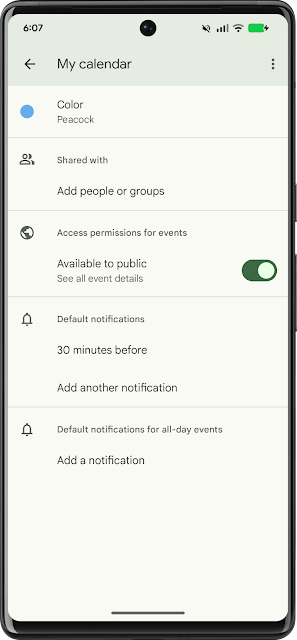
Google Calendar now supports sharing any calendar you own or have permission to share directly from Android devices.
Previously, the functionality to share Google Calendars was exclusively available on the web. This week, Google is extending this capability to Android devices, allowing users to share any calendar they own or have permission to share with other users and groups directly from their mobile device. The sharing settings available on the web, including the ability to share a calendar with individuals, a domain, or the entire public, are now mirrored on Android.
Release: Both • Rapid: 2025-07-11 • Scheduled: 2025-07-11 -
2025-07-10Comms & Meetings

Introducing Lucidchart and Lucidspark apps in Google Chat for improved collaboration and document access.
Lucidchart and Lucidspark, third-party add-ons for diagramming and virtual whiteboarding, are now integrated directly into Google Chat. This integration allows users to get immediate previews of Lucidspark and Lucidchart links shared in Chat conversations and use the “/lucidsearch” command to find and share Lucid documents instantly, enhancing team alignment by bringing visual context into conversations.
Release: Both • Rapid: 2025-07-10 • Scheduled: 2025-07-10 -
2025-07-08Content & Collaboration

Google Sites search now includes content from embedded files like Google Docs, Sheets, Slides, and PDFs.
Google Sites' search functionality has been enhanced to include content from embedded files, such as Google Docs, Sheets, Slides, and PDFs. Previously, search only covered text directly on pages. This update provides a more comprehensive and efficient search experience, allowing users to find information more easily whether it's directly on a page or within an embedded document.
Release: Both • Rapid: 2025-07-08 • Scheduled: 2025-07-31 -
2025-07-08Content & Collaboration
.gif)
Expanded Information Rights Management (IRM) controls for Google Drive, allowing file owners and shared drive managers to restrict printing, copying, and downloading for editors.
Google Drive's Information Rights Management (IRM) feature, which prevents downloading, copying, and printing of documents, has been enhanced. Previously, IRM controls could be applied by individual file owners only for viewers and commenters, and by admins for editors. Now, individual file owners and shared drive managers can also apply these printing, copying, and downloading restrictions to users with edit permissions, giving more granular control over sensitive content. Editors and owners can still edit the document, but content copying and pasting is limited to within the document itself.
Release: Both • Rapid: 2025-07-08 • Scheduled: 2025-07-08 -
2025-07-07Comms & Meetings

Google Meet "Take notes for me" now offers granular sharing controls for meeting hosts.
Google Meet has introduced new sharing controls for the "Take notes for me" feature, allowing meeting hosts and co-hosts to specify the recipients of the meeting notes. Users can now choose to send notes to all invited guests, only invited guests within their organization, or exclusively to hosts and co-hosts. The default setting is "Invited guests in your organization." Once configured, this sharing preference will apply to the specific meeting and any recurring meetings in that series, providing greater flexibility in managing sensitive meeting information.
Release: Both • Rapid: 2025-07-07 • Scheduled: 2025-07-07 -
2025-07-07Comms & Meetings
Google Meet "Take notes for me" email notifications now include meeting summaries and suggested next steps.
The email notifications generated by the "Take notes for me" feature in Google Meet have been enhanced. These emails will now provide a summary of the meeting and "suggested next steps" in addition to the direct link to the notes document. This aims to give meeting invitees a quick and helpful overview of the meeting's key takeaways in a single place, improving the utility of automated meeting notes.
Release: Both • Rapid: 2025-07-07 • Scheduled: 2025-07-07 -
2025-07-07Content & Collaboration
Google Drive Events API is now available in Developer Public Preview, enabling real-time notifications for Drive item changes.
The Google Drive Events API is now integrated with the Workspace Events API and is available in Developer Public Preview. This enables third-party developers to create subscriptions on Drive items and receive real-time notifications via Cloud Pub/Sub when those resources change. This offers a more reliable and feature-rich way of receiving events compared to existing watch methods, supporting events such as files being added, moved, edited, trashed, or when an access proposal is created or resolved.
Release: Both • Rapid: 2025-07-07 • Scheduled: 2025-07-07 -
2025-07-02Content & Collaboration
Gems are now available directly in the side panel of Google Docs, Slides, Sheets, Drive, and Gmail.
Gems, custom AI experts from the Gemini app, are now integrated into the side panel of Google Docs, Slides, Sheets, Google Drive, and Gmail. This allows users to leverage custom or pre-made AI tools, such as copywriting or sales interaction Gems, without switching applications, minimizing repetitive prompting and enhancing efficiency within their Workspace environment.
Release: Both • Rapid: 2025-07-02 • Scheduled: 2025-07-02 -
2025-07-02Content & Collaboration
Gems, custom AI experts, are now available directly in the side panel of Google Slides, allowing users to leverage customized AI assistance without switching applications.
Gems, which are custom AI experts designed to help complete specific goals, tasks, and workflows, are now integrated directly into the side panel of Google Slides. This integration allows users to utilize both custom and pre-made Gems, such as a writing editor or sales pitch ideator, within the Google Slides application. The feature aims to enhance efficiency by minimizing repetitive prompting and enabling tailored AI assistance for various tasks like creating content, generating sales interactions, or reviewing documents, all without needing to navigate away from the current application.
Release: Both • Rapid: 2025-07-02 • Scheduled: 2025-07-02 -
2025-07-02Content & Collaboration
Gems, custom AI experts, are now available directly in the side panel of Google Sheets, allowing users to leverage customized AI assistance without switching applications.
Gems, which are custom AI experts designed to help complete specific goals, tasks, and workflows, are now integrated directly into the side panel of Google Sheets. This integration allows users to utilize both custom and pre-made Gems, such as a writing editor or sales pitch ideator, within the Google Sheets application. The feature aims to enhance efficiency by minimizing repetitive prompting and enabling tailored AI assistance for various tasks like creating content, generating sales interactions, or reviewing documents, all without needing to navigate away from the current application.
Release: Both • Rapid: 2025-07-02 • Scheduled: 2025-07-02 -
2025-07-02Content & Collaboration
Gems, custom AI experts, are now available directly in the side panel of Google Drive, allowing users to leverage customized AI assistance without switching applications.
Gems, which are custom AI experts designed to help complete specific goals, tasks, and workflows, are now integrated directly into the side panel of Google Drive. This integration allows users to utilize both custom and pre-made Gems, such as a writing editor or sales pitch ideator, within the Google Drive application. The feature aims to enhance efficiency by minimizing repetitive prompting and enabling tailored AI assistance for various tasks like creating content, generating sales interactions, or reviewing documents, all without needing to navigate away from the current application.
Release: Both • Rapid: 2025-07-02 • Scheduled: 2025-07-02