All Google updates
2182 updates to Google tracked so far.
-
2017-02-27Comms & Meetings

Making some time-saving improvements to the way you navigate chats in Google Hangouts.
When you enter a conversation where there has been a lot of activity, you’ll see a Jump to Last Read button. This will take you to the last unread message in your chat denoted by # new messages indicator.
Release: Both • Rapid: 2017-02-27 • Scheduled: 2017-02-27 -
2016-08-29Comms & Meetings

Integration between Google Chrome and Google Hangouts that makes screen sharing from your Chrome browser to a Google Hangout easier than ever before.
New integration between Google Chrome and Google Hangouts that makes screen sharing from your Chrome browser to a Google Hangout easier than ever before. Signed-in Chrome users on Chrome 52 or higher will be able to use the “Cast…” menu item from Chrome to share the contents of a browser tab or their entire desktop into a Hangout.
Release: Both -
2016-08-29Comms & Meetings
With this launch, signed-in Chrome users on Chrome 52 or higher will be able to use the “Cast…” menu item from Chrome to share the contents of a browser tab or their entire desktop into a Hangout.
With this launch, signed-in Chrome users on Chrome 52 or higher will be able to use the “Cast…” menu item from Chrome to share the contents of a browser tab or their entire desktop into a Hangout. Hangouts that are scheduled on the user’s Google Calendar are shown automatically, but they can also be joined manually using the “Search” text box.
Release: GA • Rapid: 2016-08-29 • Scheduled: 2016-08-29 -
2016-08-01Comms & Meetings
New Hangouts metrics added to the Reports API, and changes to Google+ activity metrics.
New Hangouts metrics are added to the Reports API to track video calls by platform (Android, CFM, iOS, Web). Google+ active user numbers are also changing because some components and integrations have been unbundled from the core Google+ product. The new metrics reflect users of Google+ only.
Release: Both • Rapid: 2016-08-01 -
2016-08-01Comms & Meetings
New metrics on Hangouts
We are pleased to announce that we are adding new Hangouts metrics to the Reports API (part of the Admin SDK). These new metrics can be used to track video calls by platform.
Release: Both • Rapid: 2016-08-01 • Scheduled: 2016-08-01 -
2016-04-06Content & Collaboration

Updating the Google Drive plug-in for Microsoft® Office to include Outlook support.
From within Outlook for Windows, you can now: Insert files using Drive, Save local files to Drive seamlessly, Update sharing permissions
Release: Both • Rapid: 2016-04-06 • Scheduled: 2016-04-06 -
2016-01-27Content & Collaboration
Comment swiping in the Google Docs, Sheets, and Slides apps
Users can now swipe to move from one comment to the next in the iOS apps for Docs, Sheets, and Slides, as well as the Android app for Slides.
Release: Both • Rapid: 2016-01-27 • Scheduled: 2016-01-27 -
2016-01-27Content & Collaboration
Instant mentions in Google Docs, Sheets, and Slides on the web, Android, and iOS
When typing a name or email address in a comment, a list of suggested contacts will appear. Selecting a contact triggers an email notification without the need to type '+' or '@' before the name.
Release: Both • Rapid: 2016-01-27 • Scheduled: 2016-01-27 -
2016-01-27Other
Comments in the Google Sheets and Slides apps for Android and iOS
Users can now add new comments and reply to existing comments within the Google Sheets and Slides mobile apps for Android and iOS, bringing parity with the Google Docs mobile apps.
Release: Both • Rapid: 2016-01-27 • Scheduled: 2016-01-27 -
2016-01-27Content & Collaboration

Instant comments in Google Docs on the web
Users can now highlight text or hover over the edge of a page to surface a small commenting icon, allowing them to quickly add a comment to that specific area of the document.
Release: Both • Rapid: 2016-01-27 • Scheduled: 2016-02-10 -
2016-01-25Content & Collaboration
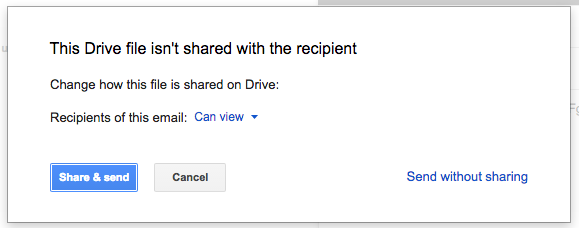
Increased admin control over Google Drive file sharing options.
Google has introduced new Access Checker settings in the Admin console, allowing administrators to define the sharing options users see when sharing Drive files via Gmail, comments in Docs, Sheets, or Slides, protected ranges in Sheets, or Calendar invites. Depending on whether external public sharing is permitted, admins can now restrict these options to 'Recipients only', 'Recipients only or their domain', or 'Recipients only, their domain, or public'.
Release: Both • Rapid: 2016-01-25 • Scheduled: 2016-01-25 -
2016-01-19Comms & Meetings

New admin control to suppress prompts when inviting external guests in Google Calendar.
Domain administrators can now enable or disable the confirmation prompts that appear when users invite guests from outside their domain to Google Calendar events. This setting can be managed globally or on a per-organizational unit (OU) basis via the Admin console under Apps > Google Apps > Calendar > Sharing Settings > External invitations. The setting is enabled by default.
Release: Both • Rapid: 2016-01-19 • Scheduled: 2016-01-19 -
2016-01-12Content & Collaboration
Improved file and folder organization in Google Drive via new toolbar options and drag-and-drop functionality.
Google Drive is making it easier to organize files and folders. Users will now see 'Add to My Drive' or 'Move to' options in the toolbar when viewing search results, Shared with me, Recent, or Starred views. Additionally, users can now drag and drop items from search results into folders and organize files directly from the preview screen.
Release: Both • Rapid: 2016-01-12 • Scheduled: 2016-01-26 -
2016-01-12Comms & Meetings

New Admin console setting allows users to book resources shared as 'See only free/busy'.
Google has introduced a new setting in the Admin console that enables users to book calendar resources even when they are shared with the domain as 'See only free/busy'. Previously, admins had to share resources as 'See all event details' to allow booking, which exposed sensitive event information. This update allows admins to maintain privacy while still permitting resource booking across the domain.
Release: Both • Rapid: 2016-01-12 • Scheduled: 2016-01-12 -
2016-01-11Content & Collaboration
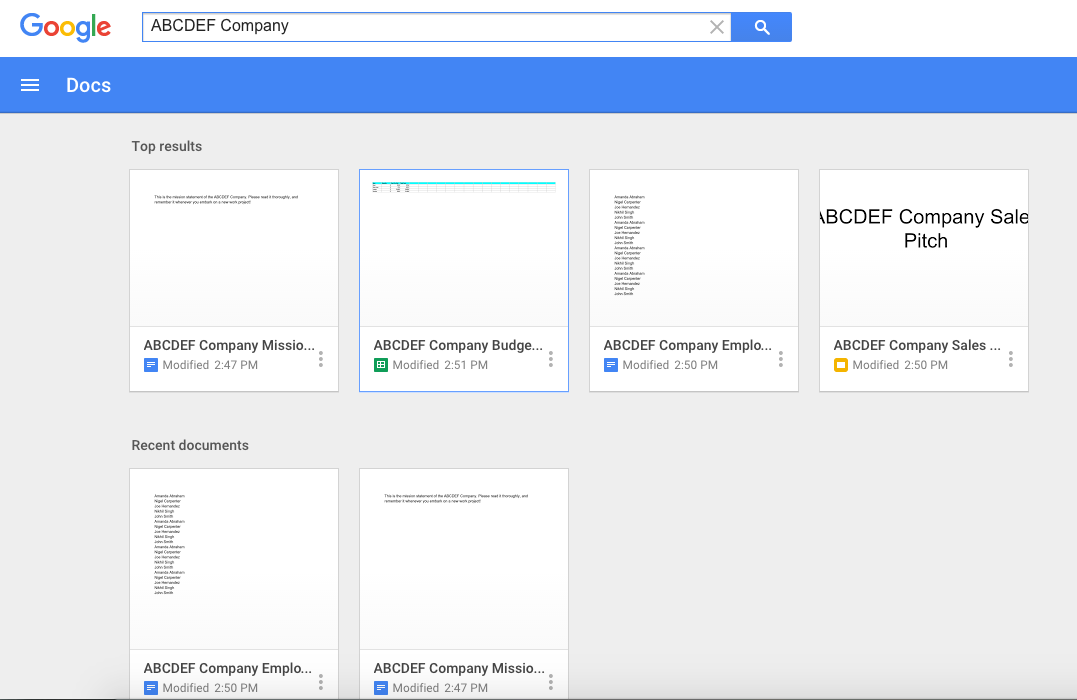
Search results on Docs, Sheets, and Slides home screens now include files from all three apps.
Google has updated the search functionality on the home screens of Google Docs, Sheets, and Slides on the web. Now, searching from any of these home screens will return results from all three applications. The results page will display 'Top results' containing a mix of relevant files, followed by a section for recent files specific to the app the user is currently accessing.
Release: Both • Rapid: 2016-01-11 • Scheduled: 2016-01-25