All Google updates
2181 updates to Google tracked so far.
-
2020-03-26Content & Collaboration

Create pointers to any file or folder in Google Drive with shortcuts
Shortcuts in Drive make it easier to organize content and point users to relevant information and files across various drives.
Release: Both • Rapid: 2020-03-26 • Scheduled: 2020-04-15 -
2020-03-26Content & Collaboration
Google Drive is transitioning to a single-location file model.
Starting September 30, 2020, it will no longer be possible to place a file in multiple folders in My Drive. All files already living in multiple locations will be gradually migrated to shortcuts to ensure every file resides in a single location.
Release: Both • Rapid: 2020-09-30 • Scheduled: 2020-09-30 -
2020-03-26Content & Collaboration
Create pointers to any file or folder in Google Drive with shortcuts
Shortcuts in Drive make it easier to organize content and point users to relevant information and files across various drives.
Release: Both • Rapid: 2020-03-26 • Scheduled: 2020-04-15 -
2020-03-19Comms & Meetings
Participants cannot re-join nicknamed meetings after the final participant has left.
To enhance teacher control, participants will no longer be able to re-join a meeting once the final participant has left if the meeting was created using a short link (e.g., g.co/meet/nickname), via the 'Join or start a meeting' field at meet.google.com, or via the Meet app using a nickname. This prevents students from joining a meeting without a teacher present.
Release: Both • Rapid: 2020-03-19 • Scheduled: 2020-03-19 -
2020-03-19Comms & Meetings
Only meeting creators and calendar owners can mute or remove other participants in Education meetings.
For G Suite for Education and G Suite Enterprise for Education customers, Google Meet is updating permissions so that only the meeting creator, Calendar event owner, or the person who creates a meeting on an in-room hardware device can mute or remove other participants. This ensures that teachers cannot be removed or muted by students during a session.
Release: Both • Rapid: 2020-03-19 • Scheduled: 2020-03-19 -
2020-03-19Comms & Meetings
Hangouts Meet improvements for remote learning
Making several improvements to improve the remote learning experience for teachers and students using Hangouts Meet. Only meeting creators and calendar owners can mute or remove other participants in a meeting. Meeting participants will not be able to re-join nicknamed meetings once the final participant has left
Release: Both -
2020-03-11Content & Collaboration
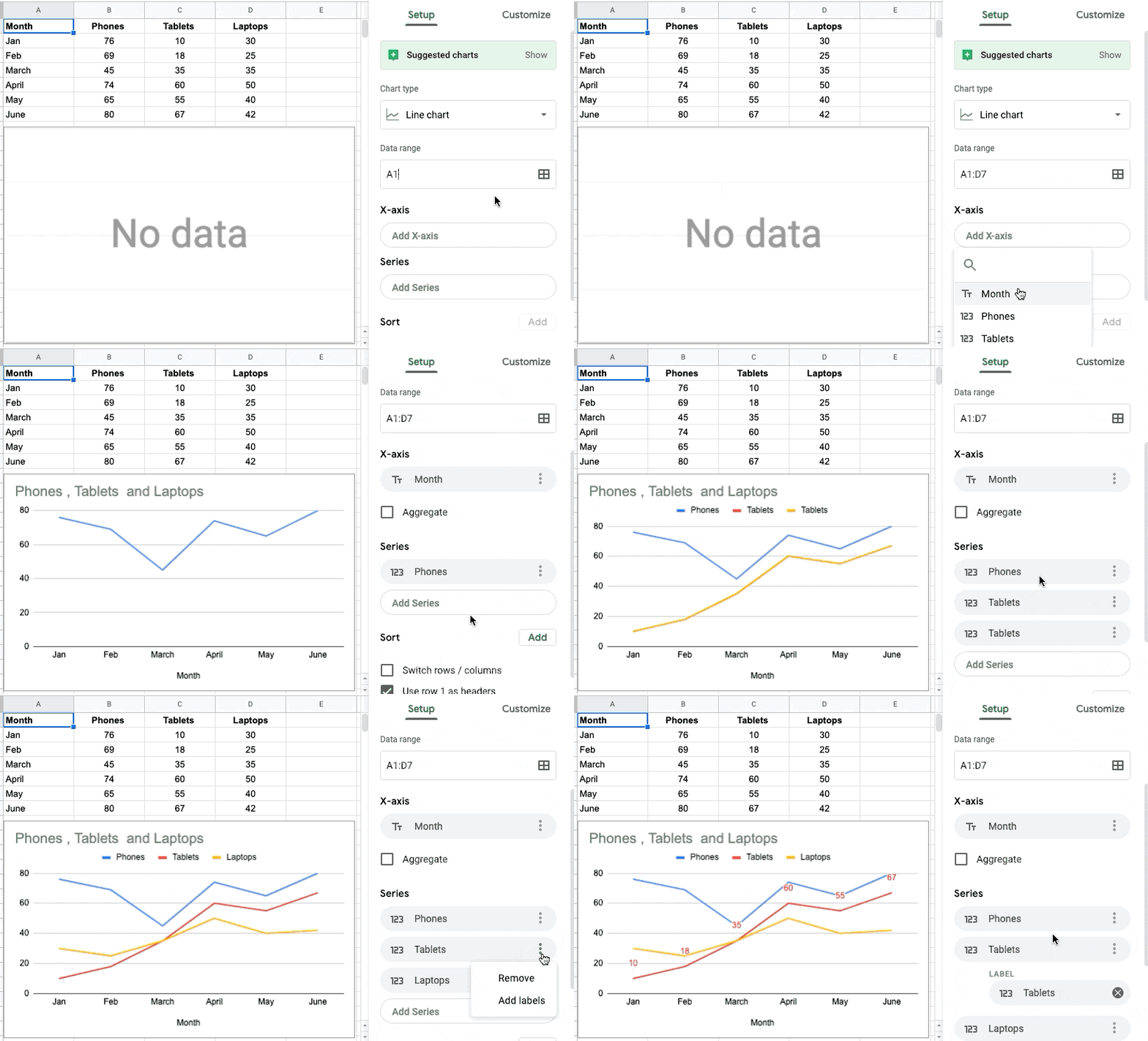
Set custom table ranges for charts in Google Sheets
Google Sheets is improving the way data is suggested and selected when creating charts. Users can now specifically select which columns to use for the chart axis and series, rather than having all data ranges on a table automatically used. This allows for quicker customization of charts to display the most relevant data when working with datasets containing slicers, pivot tables, and other elements.
Release: Both • Rapid: 2020-03-10 • Scheduled: 2020-03-30 -
2020-03-11Content & Collaboration
Set custom table ranges for charts in Google Sheets
Improving the way data is suggested and how data is selected when creating a chart in Google Sheets. Allowing to select which columns to use for the chart axis and series
Release: Both • Rapid: 2020-03-10 • Scheduled: 2020-03-30 -
2020-03-11Content & Collaboration

Sort and filter cells by text or fill color in Google Sheets
Added two additional parameters to filter and sort cells by in Google Sheets: Text color and Fill (background) color.
Release: Both • Rapid: 2020-03-11 • Scheduled: 2020-03-23 -
2020-03-09Comms & Meetings

Google launches a beta for a new, modern Google Groups interface.
Google is introducing a new user interface for Google Groups that features a modern look and streamlined controls consistent with other G Suite tools. Organizations can apply for beta access to test the new UI and prepare for migration. While some features like collaborative inboxes, tags, and categories are not available in the beta, users have the option to revert to the classic Groups interface at any time. The rollout will move from beta to general availability and eventually to a mandatory transition for all users later in the year.
Release: Scheduled • Scheduled: 2020-03-09 -
2020-03-09Comms & Meetings
Experience the new Google Groups, launching in beta
Replacing the current Google Groups interface with a new experience in beta. The new Groups experience features a modern, fresh look and controls that are streamlined, intuitive, and consistent with other G Suite tools like Gmail.
Release: Beta -
2020-03-09Content & Collaboration

Fix images to a certain location on a page in Google Docs
In Google Docs, you can now position an image in a fixed place, ensuring it stays in a certain spot on the page and is not disrupted by text and other elements.
Release: Both • Rapid: 2020-03-09 • Scheduled: 2020-03-30 -
2020-03-09Content & Collaboration
Improved image positioning and formatting options in Google Docs.
Google Docs now allows users to fix images to a specific location on a page, ensuring they remain in place regardless of text or other element changes. Additionally, a new image options sidebar has been introduced, providing quick access to formatting settings such as size, rotation, brightness, and contrast.
Release: Both • Rapid: 2020-03-09 • Scheduled: 2020-03-30 -
2020-03-06Other

Expanded browser support for enrolling security keys on Android and MacOS.
Google is making it easier to enroll security keys on Android and MacOS devices by allowing additional web browsers for initial registration. Users can now register security keys on Android devices running Android 7.0 and up using Chrome version 70 and up, and on MacOS devices using Safari version 13.0.4 and up. This applies to both independent registrations and those within the Advanced Protection Program for enterprise.
Release: Both • Rapid: 2020-03-06 • Scheduled: 2020-03-06 -
2020-03-06Other
Enroll security keys on more devices
Making it easier to enroll security keys on Android and MacOS devices by making it possible to use additional web browsers to initially register the security keys to your account.
Release: Rapid