-
2021-10-18More
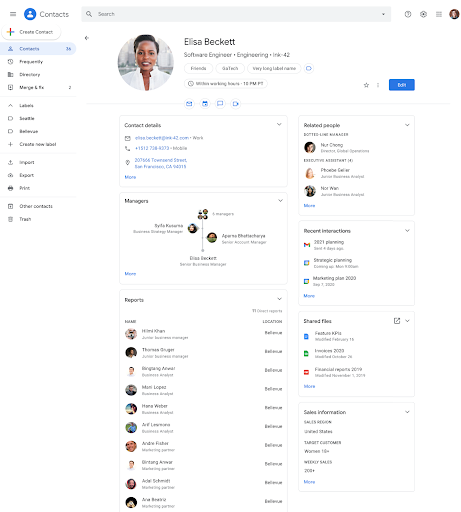
Google Contacts now displays additional organizational information including local time, working hours, non-manager relationships, shared files, and custom attributes.
Google Contacts is introducing several new information fields for users within an organization to provide better context about colleagues and stakeholders. These updates include the display of a user's local time, a visual indicator (crescent moon and purple banner) for working hours based on Google Calendar settings, the ability to view non-manager relationships such as administrative business partners, a list of shared Drive files, and organization-specific custom attributes like Team or Skills.
Release: Both • Rapid: 2021-10-18 • Scheduled: 2021-10-18 -
2021-10-18Comms & Meetings
Mark Google Chat direct messages and Spaces as read or unread on mobile and web.
Users can now mark Google Chat direct messages (DMs) or Spaces as read or unread on both mobile and web platforms. In 1:1 and group DMs, users can mark a thread as unread starting from a specific message by hovering over the message and clicking the mark as unread icon, helping them remember to return to the conversation later.
Release: Both • Rapid: 2021-10-18 • Scheduled: 2021-10-18 -
2021-10-14Comms & Meetings
New beta for data loss prevention (DLP) in Google Chat
Google has introduced a beta for data loss prevention (DLP) in Google Chat, allowing administrators to create custom policies to prevent sensitive and confidential information from leaking outside their organization. Admins can choose to either audit violations or block end users from sending sensitive content, and they will be alerted about policy violations to facilitate quick investigation and action.
Release: Rapid -
2021-10-11Comms & Meetings
Expanded device support and default availability for continuous framing on Google Meet hardware.
Google is expanding continuous framing support to more Meet-certified cameras, including the Logitech PTZ Pro 2, Logitech MeetUp, and Logitech Rally. Additionally, the continuous framing toggle will now be available by default for eligible devices in the meeting room settings, provided it hasn't been explicitly disabled in the Admin console.
Release: Both • Rapid: 2021-10-11 • Scheduled: 2021-10-11 -
2021-10-11Other
Updated flows for managing 2-step verification backup codes.
Google has updated the user experience for managing backup codes for 2-step verification. Users will now be directed to a dedicated backup codes page to generate, refresh, print, or download codes, and a new option to delete backup codes has been added. This update is available on web, Android, and iOS devices.
Release: Both • Rapid: 2021-10-11 • Scheduled: 2021-10-11 -
2021-10-06Comms & Meetings
Hand raising is now available on Google Meet hardware devices.
Google is extending the hand raising feature to all Google Meet hardware to improve the hybrid working experience. Users on touch controllers can tap 'Raise Hand' at the top, while those using room kits with remote controls can access the feature via the participant list. Moderators and participants will see a list of raised hands in the order they were raised, along with notifications and badges on video tiles.
Release: Both • Rapid: 2021-10-06 • Scheduled: 2021-10-06 -
2021-10-05Comms & Meetings
Configure member restrictions for Google Groups in open beta.
Google is introducing group-level controls that allow administrators to restrict group memberships based on whether members are internal or external, and by member type (service account, user, or group). This feature, available in open beta, helps ensure groups remain secure and properly configured by preventing new changes that violate established restrictions and identifying existing violating memberships.
Release: Both • Rapid: 2021-10-05 • Scheduled: 2021-10-05 -
2021-10-05Comms & Meetings
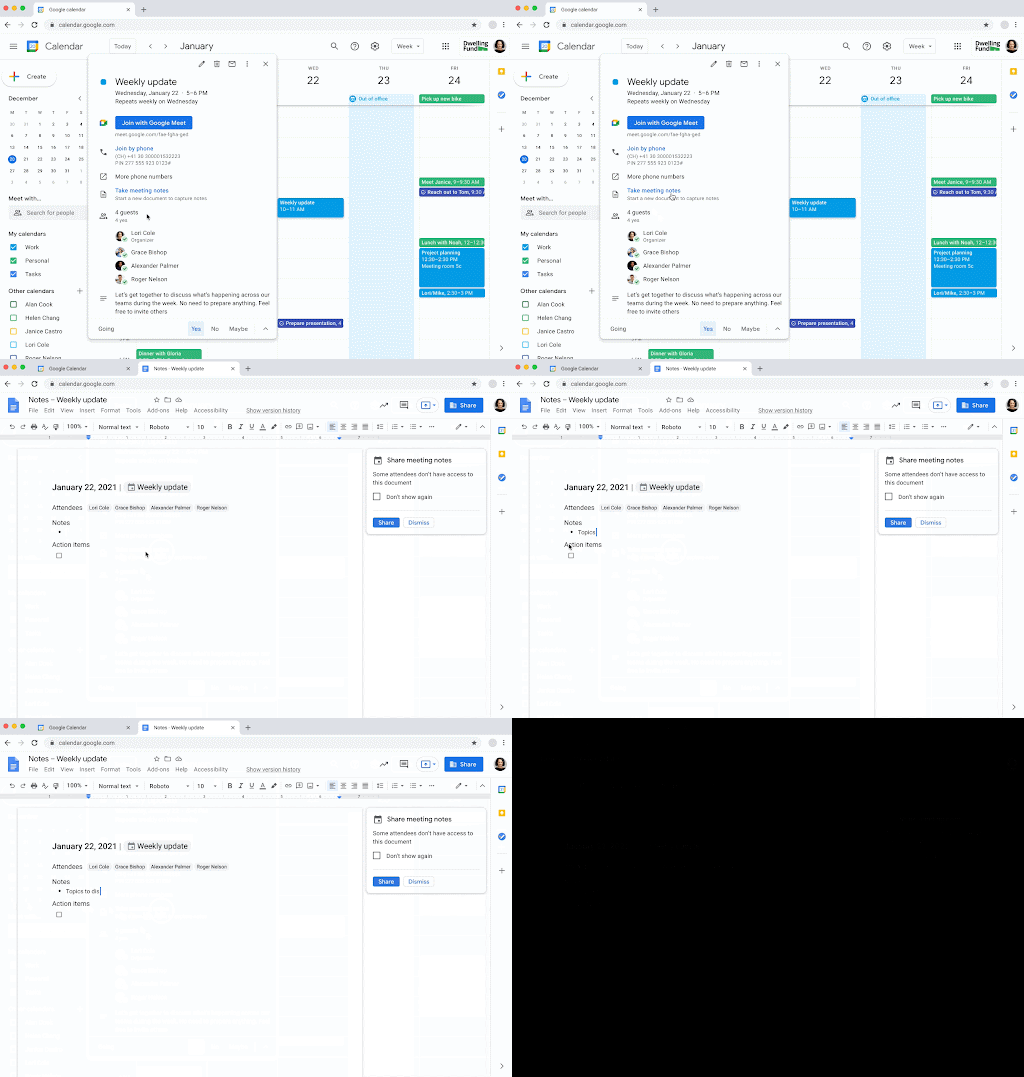
Create and share meeting notes documents directly from Google Calendar events.
Google Calendar now allows users to quickly start and share meeting notes documents for events. By using the 'Create meeting notes' button during event creation or the 'Take meeting notes' button in a scheduled event, a Google Doc is automatically generated, populated with event details, and attached to the calendar event. This integration streamlines the process of capturing notes and ensures easy navigation between the calendar event and the corresponding document.
Release: Both • Rapid: 2021-10-05 • Scheduled: 2021-10-19 -
2021-10-04Other
View richer coworker information in the sidebar for Google Chat, Calendar, Docs, Sheets, and Slides.
Users can now access additional information about people within their organization, including contact details, team and manager information, and office or desk locations, directly within the sidebars of Google Chat, Calendar, Docs, Sheets, and Slides. This feature, which was already available in Gmail, allows for better visibility of organizational directory data across multiple Google Workspace products.
Release: Both • Rapid: 2021-10-04 • Scheduled: 2021-10-04 -
2021-10-04Comms & Meetings

The Class Meet link is now accessible on the side of the class stream and students will be directed to a waiting room.
We’ve added several new features to Google Meet in Classroom, making it easier and more secure: The Class Meet link is now accessible on the side of the class stream, so students can easily join and teachers can manage the link from the stream. Students will be directed to a waiting room until a teacher has officially joined the class Meet link.
Release: GA • Rapid: 2021-10-04 • Scheduled: 2021-10-04 -
2021-10-04Comms & Meetings
The Class Meet link is now accessible on the side of the class stream and students will be directed to a waiting room.
We’ve added several new features to Google Meet in Classroom, making it easier and more secure: The Class Meet link is now accessible on the side of the class stream, so students can easily join and teachers can manage the link from the stream. Students will be directed to a waiting room until a teacher has officially joined the class Meet link.
Release: GA • Rapid: 2021-10-04 • Scheduled: 2021-10-04 -
2021-10-04Education
Google Classroom video meetings are now easier and more secure with new Google Meet integration features.
Google has introduced several improvements to Google Meet within Google Classroom to enhance security and management. Key updates include placing the Class Meet link on the side of the class stream for easier access, implementing a waiting room for students until the teacher joins, requiring guests not on the class roster to ask for admission, and automatically granting co-host status to designated co-teachers to allow them to start meetings independently.
Release: Both • Rapid: 2021-10-04 • Scheduled: 2021-10-04 -
2021-10-01Comms & Meetings
Porting in Google Voice now available in Canada
Organizations in Canada that have existing phone numbers with other service providers can now port those numbers over to Google Voice.
Release: Both • Rapid: 2021-10-01 • Scheduled: 2021-10-01 -
2021-10-01Content & Collaboration

The 'Present' button in Google Slides is being renamed to 'Slideshow'.
Google is replacing the existing 'Present' button in Google Slides with a new 'Slideshow' button. This change is intended to make it clearer for users when they are beginning a slide show or sharing their screen during a Google Meet session.
Release: Both • Rapid: 2021-10-01 • Scheduled: 2021-10-04 -
2021-10-01Content & Collaboration
Quickly access Google Drive files in Chrome browser.
We’re adding a card onto the New Tab Page in your Chrome browser that will surface relevant files from your Google Drive, making it easier and more efficient to find the files you need.
Release: GA • Rapid: 2021-10-01 • Scheduled: 2021-10-01