All Google updates
2258 updates to Google tracked so far.
-
2023-09-27Comms & Meetings
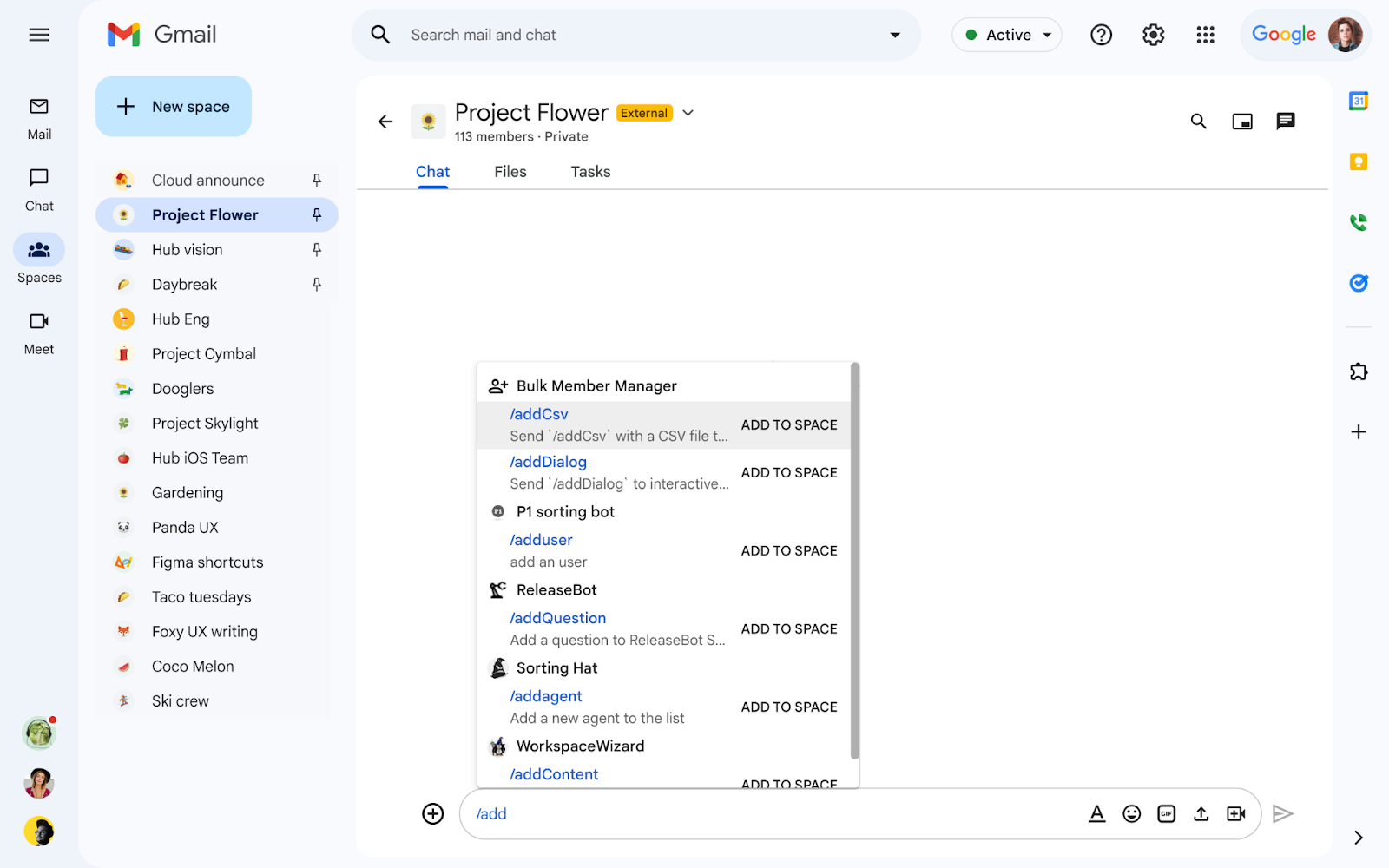
We’re introducing a new app for Google Chat called Bulk Member Manager that enables space managers and space members to easily add or remove members to or from a space in bulk.
We’re introducing a new app for Google Chat called Bulk Member Manager that enables space managers and space members, who have permission to manage members, to easily add or remove members to or from a space in bulk. In addition to the new membership search feature and the ability to add up to 50,000 members to spaces in Google Chat, this update will help you better organize people, topics, and projects to help ensure effective conversations take place in spaces.
Release: Both -
2023-09-27Comms & Meetings
Introduction of the Bulk Member Manager app for Google Chat to add or remove members in bulk.
Google Chat has introduced the Bulk Member Manager app, enabling space managers and authorized members to efficiently add or remove members from a space in bulk. The app supports slash commands such as /addDialog and /removeDialog for copy-pasting email addresses, as well as /addCsv and /removeCsv for processing .csv attachments.
Release: Both • Rapid: 2023-09-27 • Scheduled: 2023-09-27 -
2023-09-26Comms & Meetings

Email templates are now available in Google Groups for creating and reusing messages.
Users can now create, save, modify, and delete email templates directly within Google Groups. This feature allows users to save composed messages as templates to reuse in the future, reducing the need to type repetitive messages from scratch and accelerating workflows for tasks such as lead introductions, sharing daily homework assignments, or sending project updates.
Release: Both • Rapid: 2023-09-26 • Scheduled: 2023-09-26 -
2023-09-26Comms & Meetings
When you’re using Groups to send messages, you can save a composed message as a template to reuse in the future.
When you’re using Groups to send messages, you can save a composed message as a template to reuse in the future. Directly in Groups, you can create and save messages as a template. Templates can also be deleted.
Release: Both -
2023-09-26Comms & Meetings

The new “Manage apps” and “Manage webhooks” options will allow space managers to control the ability of space members to add and remove apps and webhooks to a space.
We’re adding two new controls to the list of space manager capabilities in Google Chat that were introduced earlier this year to ensure effective conversations take place in spaces. The new “Manage apps” and “Manage webhooks” options will allow space managers to control the ability of space members to add and remove apps and webhooks to a space.
Release: Both • Rapid: 2023-09-26 • Scheduled: 2023-09-26 -
2023-09-26Comms & Meetings
New full screen view for managing apps and webhooks in Google Chat spaces.
A new full screen view is now available on the web version of Google Chat, allowing space managers to view all installed apps and webhooks within a space in one place.
Release: Both • Rapid: 2023-09-26 • Scheduled: 2023-09-26 -
2023-09-26Comms & Meetings
Updated '@' mentions dialog notification in Google Chat spaces.
Google Chat has updated the '@' mentions dialog notification to provide specific explanations as to why a particular user or app cannot be added to a space.
Release: Both • Rapid: 2023-09-26 • Scheduled: 2023-09-26 -
2023-09-26Comms & Meetings
New 'Manage apps' and 'Manage webhooks' controls for Google Chat space managers.
Google Chat is introducing two new controls for space managers: 'Manage apps' and 'Manage webhooks'. These options allow space managers to control whether space members have the ability to add or remove apps and webhooks within a space.
Release: Both • Rapid: 2023-09-26 • Scheduled: 2023-09-26 -
2023-09-22Comms & Meetings
Configurability and activation of peripheral email alerts by issue type.
The ability to configure peripheral email alerts by issue type, including the activation of email alerts for missing display issues, will go into effect starting October 11, 2023. Admins can modify these settings in the Admin console ahead of this date to opt out of specific peripheral issue notifications.
Release: Both • Rapid: 2023-10-11 • Scheduled: 2023-10-11 -
2023-09-22Comms & Meetings
Visibility of missing display issues and peripheral alert settings in the Admin console.
Admins can now monitor missing display issues in the Google Meet hardware Admin console and access a new setting to select which peripheral issue types they wish to be alerted about. This feature began rolling out on September 21, 2023, and may take up to 10 days to become visible on all domains.
Release: Both • Rapid: 2023-09-21 • Scheduled: 2023-09-21 -
2023-09-22Comms & Meetings
New options to fine tune your alerts for Google Meet hardware issues from the Admin console.
Now that ChromeOS M108 has rolled out to Meet hardware devices, we’re sharing an update on the rollout of some of those features, including new options to fine tune your alerts: Missing display issues began rolling out in the Admin console on September 21 and may take up to 10 days to go into effect on all domains. You will be able to select which specific peripheral issue types you want to be alerted about from a new Admin console setting that also began rolling out on September 21 and may take up to 10 days to go into effect on all domains. If you don’t want to receive display alerts (or any other type of peripheral issues), you can opt out using the new setting.
Release: Both • Rapid: 2023-09-21 • Scheduled: 2023-09-21 -
2023-09-19Comms & Meetings

Increased the limit of questions per meeting or livestream from 200 to 500.
Google Meet has increased the maximum capacity for questions in both standard meetings and livestreams, raising the limit from 200 to 500 questions per session.
Release: Both • Rapid: 2023-09-19 • Scheduled: 2023-09-19 -
2023-09-19Comms & Meetings
Meeting hosts can now turn Q&A on or off for livestreams.
Google Meet has introduced the ability for meeting hosts to enable or disable the Q&A feature specifically for livestream viewers, allowing for better control over audience interaction during live broadcasts.
Release: Both • Rapid: 2023-09-19 • Scheduled: 2023-09-19 -
2023-09-19Comms & Meetings
Meeting hosts can turn Q&A on and off for livestreams and increase the question limit.
Meeting hosts can now enable Q&A and poll features for livestreams. We’ve also increased the limit of questions per meeting or livestream from 200 to 500.
Release: Both • Rapid: 2023-09-19 • Scheduled: 2023-09-19 -
2023-09-19Comms & Meetings

Google Chat introduces message bubbles to differentiate between incoming and outgoing messages.
Google Chat is introducing message bubbles to help users more easily distinguish between incoming and outgoing messages in the chat stream. Incoming messages will be aligned to one side with a solid color background, while outgoing messages will be aligned to the opposite side with a different color background, improving the overall visual organization of conversations.
Release: Both • Rapid: 2023-09-19 • Scheduled: 2023-10-03